RICARDO TORRES
GAMEPLAY SCRIPT & DESIGN
OVERVIEW
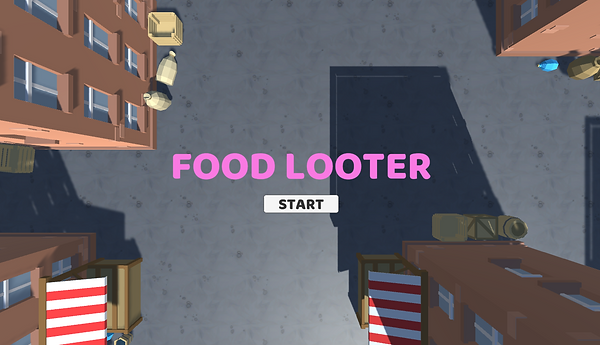
FOOD LOOTER is my second game. In this project, I designed the game first and then applied what I knew in Unity to make it real, the difference lies in the need for more research due to some unexpected difficulties. You can play it here: https://play.unity.com/mg/other/food-loter-game-1-0
GAME DESIGN
The design for Food Looter was focused on creating a game where you could feel playing as a Raccoon, I focused on what element it has that can create that sensation, and tried to apply it.
After choosing the rules and what would be the main core loop of gameplay, I ended up with this mockup

A few prototypes later and perceiving that the project was taking more than it should, I decided to take away the “bystanders”, due to them making the game loop slower than it should, and after that, the game was primary elements were done
It wasn’t that much of a challenge game design-wise, but I was satisfied with the end result.
FINAL FEATURES
-
A raccoon that can move and collects food
-
Stalls that drop food randomly after getting stealed
-
Enemies that follow you
-
A predetermined level
-
A start and game over screen
-
A UI text that shows the score
SCRIPTING
Scripting this game was a bit of a challenge due to trying to implement stuff out of the course with the main mechanics, being the interaction from Player-Stall-Collectible more difficult than I thought.
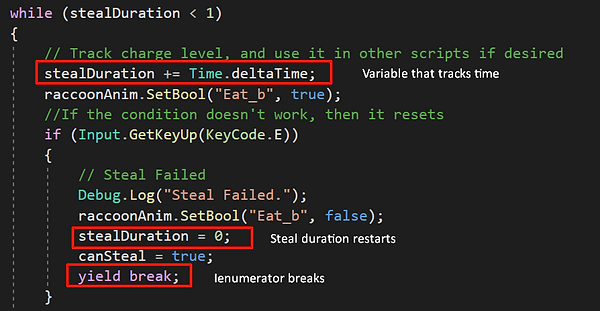
THE STEAL MECHANIC
My goal with this was to implement an action that has a fixed time for stealing, and after that, it drops the collectibles.
For that to work. First, I created a sequence that starts when you press the STEAL button (in this case the input is "E").
Secondly, I created an IEnumerator that has a fIoat variable that tracks the Time after the IEnumerator start, this breaks if the button isn't held, not completing the action and restarting the counter, but, if the action is completed it changes a bool variable that completes the STEAL action
Lastly, I created a bool and sequence of code that allows the loop of the STEAL action to work as intended
STALLS
Making them work wasn’t that hard, but, the interaction it has with the player and collectibles, was trickier.
Most of it functions are regulated by the player. The only purpose of the stall is to have the 1st collectibles, drop the collectibles and controlling their physics so they work properly, and have a steal cooldown so they cannot be spammable.
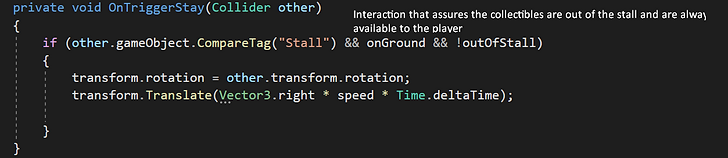
Almost everything is controlled from the player with OnTrigger interactions, so the only Stall that works is the one that the player is interacting with
COLLECTIBLES
The challenge with the collectibles were related to the different stages, what I did was controlling the physics depending if it were inside the stall or out, and after it was launched.
Also, learned that is better to use the PLAYER for "refilling" the stalls with collectibles, due to being the one that has direct interaction with the object, in this case the STALL that launches the collectibles. I did this with the Instantiate function. Here are the scripts with the logic explained
Script that show how Player instantiates the collectibles
Script that shows how the collectibles stop moving forward when they collide with objects
Script that shows how the collectible rotate themselves horizontally after being launch
Script that shows how collectibles have different launching rotations
Script that shows how collectibles are always out of the stall
CONCLUSION
In summary, after finishing this game I ended up learning the following takes:
-
A videogame requires daily work and continuous problem solving
-
Research is essential for debugging or looking for solutions on how to implement gameplay mechanics and elements
-
Working first on the logic always pay off, so starting with pseudocode is invaluable.
-
Build everything one piece at a time (that includes features, mechanics, npcs, etc). The game builds over time, not all at once
-
Interactions related to multiple objects that share the same script is better done with an interacting object than with the script.
-
Testing the game loop on analog helps you save time in regards of what elements are important or not
-
Plan your code for including game state-related variables since the start
-
Bugs are the bread and butter of making a videogame, get use to facing them